
html tutorial - <a> Anchor tag in HTML - html5 - html code - html form
Learn html - html tutorial - anchor a tag in html - html examples - html programs
- <a> tag specifies hyperlink and that is used to link the pages from one page to another.
- The "href" attribute is the most important attribute for the <a> tag, which is used to declare the page link goes to.
- The anchor tag supports the Global and Event attribute.
- By default, all browsers the links are appeared as following
- An unvisited links are indicated blue color with underlined.
- A visited links are indicated purple color with underlined.
- An active links are indicated red color with underlined.
Syntax for <a> tag in HTML:
<a href="file path or website URL">hyperlink text</a>Differences between HTML 4.01 and HTML5 for <a> tag:
HTML 4.01
- An <a> tag could be either an anchor or a hyperlink.
HTML5
- An <a> tag always a hyperlink. If there is no href attribute then it can only be a placeholder for a hyperlink.
Sample coding for <a> tag:
 Tryit<!DOCTYPE html>
  <html>
    <body>
       <a href=”http://www.wikitechy.com”>Wikitechy</a>
    </body>
  </html>
Code Explanation for <a> tag :
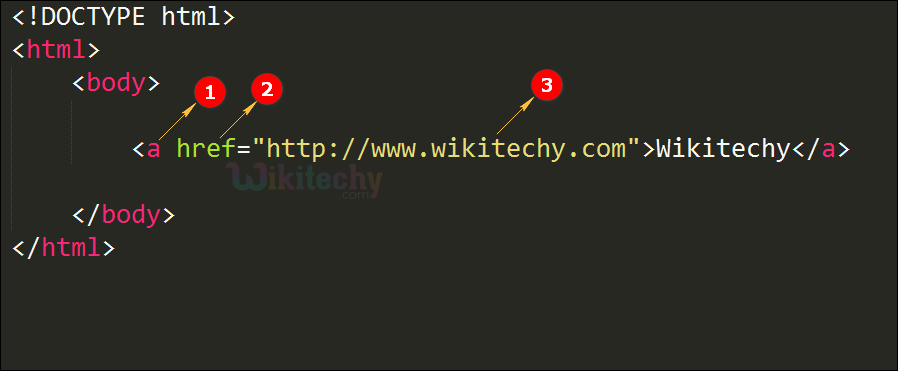
- The anchor element used to representing the hyperlink.
- "href" attribute is used to define the url path (or) link.
- "http://www.wikitechy.com" is global link to the wikitechy website.
Output for <a>Tag :
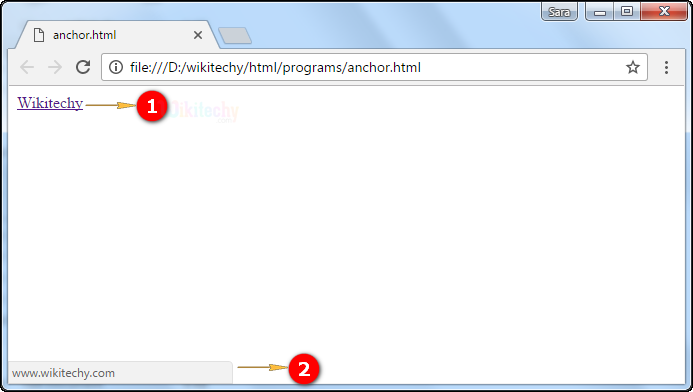
- Here the output shows the term "Wikitechy" that has been hyper linked which will navigate to wikitechy.com.
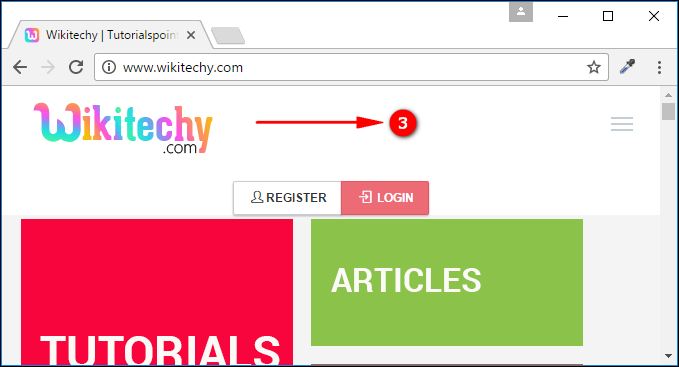
- Here we can see the navigation of www.wikitechy.com which is being loaded in the browser window as.
- When user click the wikitechy that navigate to www.wikitechy.com website.
Attribute List :
| Attribute | Value | HTML4 | HTML5 | Description |
|---|---|---|---|---|
| value | number | Yes | Yes | Specifies the value of a list item. |
| charset | char_encoding | Yes | No | Specifies the character-set of a linked document. |
| coords | coordinates | Yes | No | Specifies the coordinates of a link. |
| download | filename | No | Yes | Specifies that the target will be downloaded when a user clicks on the hyperlink. |
| href | URL | Yes | Yes | Specifies the URL of the page the link goes to. |
| hreflang | language_code | Yes | Yes | Specifies the language of the linked document. |
| media | media_query | No | Yes | Specifies what media/device the linked document is optimized for. |
| name | section_name | Yes | No | Specifies the name of an anchor. |
| rel | alternate author bookmark external help license next nofollow noreferrer noopener prev search tag |
Yes | Yes | Specifies the relationship between the current document and the linked document. |
| rev | text | Yes | No | Specifies the relationship between the linked document and the current document. |
| shape | default rect circle poly |
Yes | No | Specifies the shape of a link. |
| target | _blank _parent _self _top framename |
Yes | Yes | Specifies where to open the linked document. |
| type | media_type | Yes | Yes | Specifies the media type of the linked document. |
Browser support for <a> tag:
 |
 |
 |
 |
 |
|---|---|---|---|---|
| Yes | Yes | Yes | Yes | Yes |
Tips and Notes:
- If href attribute is not present. The attributes hreflang, media, download, target, type and rel can’t be present.